tofa
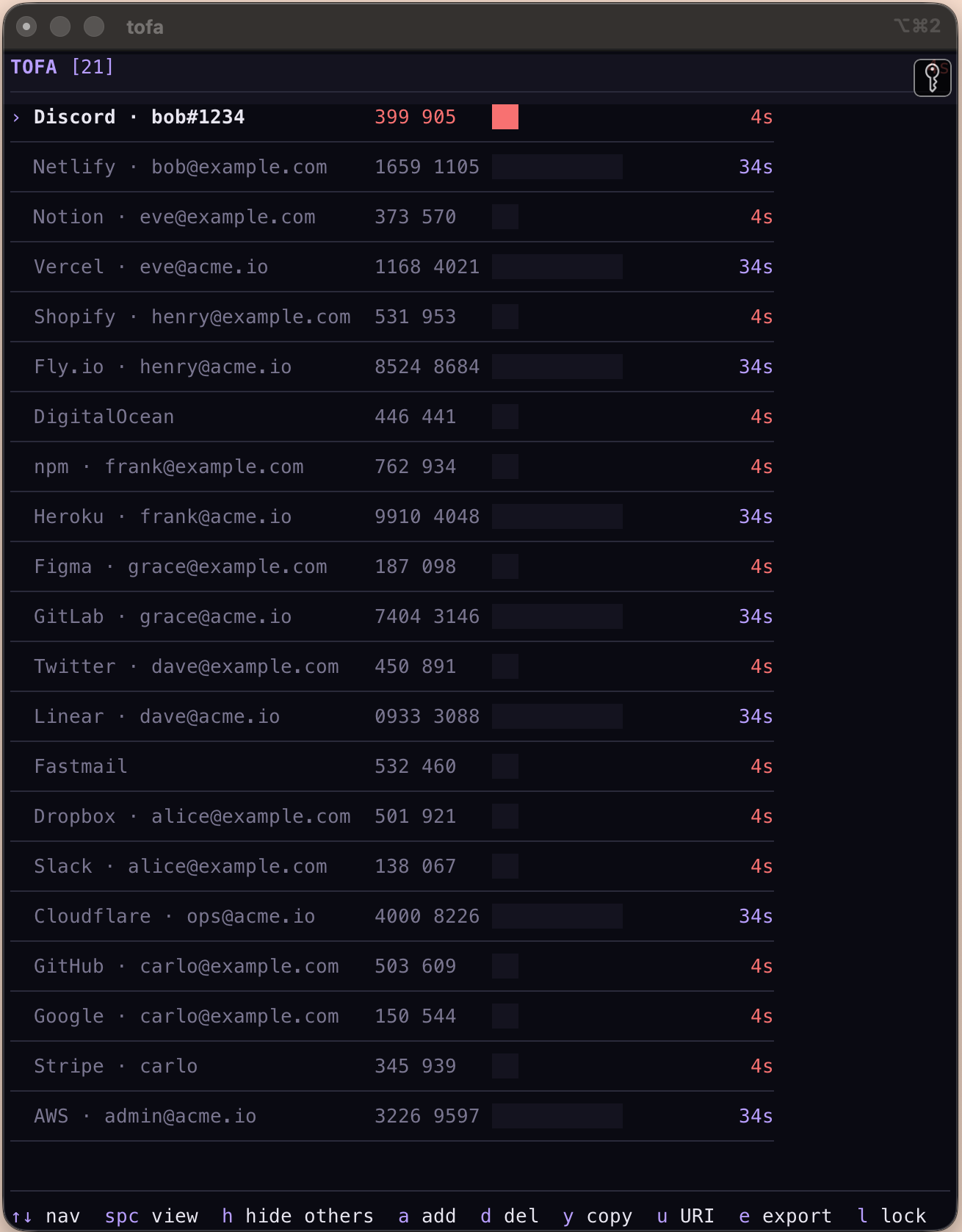
tofa is an offline, encrypted 2FA tool for the terminal. Secrets stay on your
machine in an AES-256-GCM vault — no cloud, no account, no telemetry.
Looking for the marketing site, installer one-liner, demos, and FAQ? → https://tofa.stratif.io
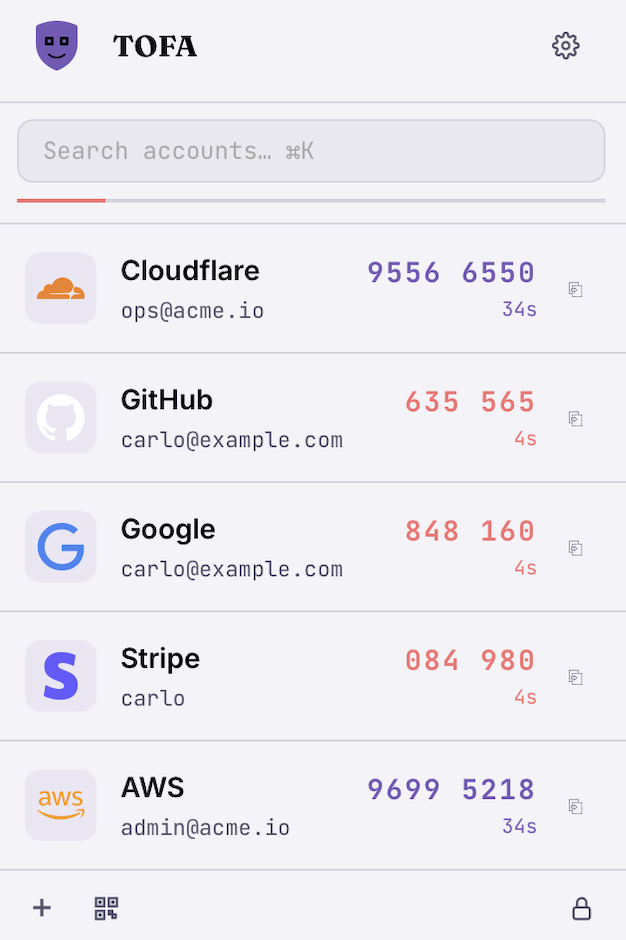
This site primarily documents the command-line interface and its companion TUI. The macOS menu bar app — pictured above — reads the same vault and is covered in the project README.
What's in here
- Getting started — install, create a vault, add your first account.
- CLI reference — every subcommand, with flags auto-synced to the source.
- Recipes — common workflows like
importing from Aegis or scripting with
TOFA_PASSPHRASE. - Security model — what the vault protects, and how.
Installation
Shell installer (macOS or Linux)
The quickest way — no Rust required:
curl -fsSL https://tofa.stratif.io/install.sh | sh
Installs to ~/.local/bin/tofa. To pin a specific version:
VERSION=0.11.0 curl -fsSL https://tofa.stratif.io/install.sh | sh
Homebrew (macOS or Linux)
brew tap stratif-io/tofa
brew install tofa
Cargo (from crates.io)
cargo install tofa
From source
tofa is written in Rust. Install rustup (1.78 or newer),
then:
git clone https://github.com/stratif-io/tofa
cd tofa
cargo install --path tofa
The binary tofa lands in ~/.cargo/bin.
Verify the install
tofa --version
What's next
Create your first vault: see Quick start.
Quick start
1. Create a vault
tofa init
You'll be asked for a passphrase. The vault is created at
~/Library/Application Support/tofa/vault.enc on macOS or
~/.config/tofa/vault.enc on Linux.
2. Add an account
From a base32 secret:
tofa add --name "GitHub:you" --secret JBSWY3DPEHPK3PXP
From an otpauth:// URI:
tofa add --uri "otpauth://totp/GitHub:you?secret=JBSWY3DPEHPK3PXP&issuer=GitHub"
From a QR image on disk:
tofa add --qr ~/Downloads/github-qr.png
3. Get a code
tofa code GitHub:you
Pipe to your clipboard:
tofa code GitHub:you | pbcopy   # macOS
tofa code GitHub:you | xclip    # Linux
4. Open the TUI
tofa
Live countdown bars, mouse support, violet accent.
Vault & passphrase
The vault is a single AES-256-GCM-encrypted file containing every account's
secret. The passphrase you set during tofa init is the only key — losing it
makes the vault unrecoverable.
Where it lives
| OS | Default path |
|---|---|
| macOS | ~/Library/Application Support/tofa/vault.enc |
| Linux | ~/.config/tofa/vault.enc |
Override with the --vault <PATH> flag (works on every command) or the
TOFA_VAULT env var.
Passphrase cache
Once you unlock the vault in the TUI or app, the passphrase is held in memory for 10 minutes of inactivity, then zeroed. Each CLI invocation prompts fresh — there is no daemon.
Changing the passphrase
tofa rekey
You'll be asked for the current and new passphrases. The vault is rewritten atomically.
Destroying the vault
tofa destroy
Permanently deletes the vault file. There is no undo.
See also
tofa init·tofa rekey·tofa destroy- Security model for the cryptographic details.
CLI reference
Every tofa subcommand documented in one place. Auto-generated synopsis and
flags are kept in sync with the source by an xtask tool — they cannot drift.
Global options
These work on every subcommand:
| Flag | Description |
|---|---|
--vault <PATH> | Override the vault path. Reads from TOFA_VAULT env var as fallback. |
--help, -h | Print help. |
--version, -V | Print the version. |
Environment variables
| Variable | Effect |
|---|---|
TOFA_VAULT | Default vault path when --vault is not given. |
TOFA_PASSPHRASE | If set, used instead of an interactive prompt. Avoid in production — tofa prints a warning to stderr when it reads this. |
Commands
| Command | Purpose |
|---|---|
init | Create a new encrypted vault. |
list | List every account. |
code | Print the current TOTP code for one account. |
add | Add an account from secret, URI, or QR. |
remove | Remove an account. |
rename | Rename an account. |
qr | Print a QR code for one account or all. |
rekey | Change the vault passphrase. |
export | Dump every account as JSON or as a list of otpauth:// URIs. |
import | Import from any supported file: single- or multi-QR images, migration QRs, JSON / CSV / TXT exports from other authenticators, or a zip archive of any of the above. |
scan | Capture every connected display and import every QR visible on screen. |
cam | Open the webcam and wait for a QR. |
completions | Print shell completions. |
destroy | Permanently delete the vault. |
tofa init
Create a new encrypted vault. Run this once before any other command.
Synopsis
tofa init
Examples
Initialize the default vault:
$ tofa init
Choose a passphrase: ********
Confirm passphrase: ********
✓ vault created at /Users/you/Library/Application Support/tofa/vault.enc
Use a custom path:
$ tofa --vault ~/secrets/work-vault.enc init
Or via env var:
$ TOFA_VAULT=~/secrets/work-vault.enc tofa init
Notes
- Exit code
0on success. - Refuses to overwrite an existing vault file. Move or delete it first if you
really want to start over (consider
destroyfor that). - The passphrase is asked twice and must match. There is no recovery — losing the passphrase makes the vault unreadable forever.
See also
tofa rekey— change the passphrase later.tofa destroy— wipe the vault.- Vault & passphrase — broader explanation.
tofa list
List every account in the vault, sorted by id. Pass --codes to also print
the current TOTP and time remaining.
Synopsis
tofa list [FLAGS]
Flags
| Flag | Description |
|---|---|
--codes <CODES> | Also display current codes and time remaining |
Examples
Names only (fastest):
$ tofa list
Passphrase: ********
GitHub:you
Discord:you
Slack:work
With live codes and countdown:
$ tofa list --codes
Passphrase: ********
┌─────────────────────────────────────┬──────────┬─────────┐
│ name                                │ code     │ expires │
├─────────────────────────────────────┼──────────┼─────────┤
│ GitHub:you                          │ 482 913  │ 21s     │
│ Discord:you                         │ 705 224  │ 21s     │
│ Slack:work                          │ 169 380  │ 21s     │
└─────────────────────────────────────┴──────────┴─────────┘
Notes
- Output is sorted alphabetically by id.
--codesis a switch (no value); the<CODES>placeholder in the auto-generated table above is a clap quirk for boolean flags. Just write--codes.- For a single account in a script, prefer
tofa code.
See also
tofa code
Print the current TOTP code for one account. Takes the account id (or a prefix) as the first positional argument.
Synopsis
tofa code [FLAGS]
Flags
| Flag | Description |
|---|---|
--raw <RAW> | Output bare digits without space (for scripting) |
--copy <COPY> | Copy to clipboard (the code by default; the otpauth:// URI when --uri is set) |
--watch <WATCH> | Refresh every second until Ctrl+C |
--uri <URI> | Print/copy the entry's otpauth:// URI instead of the current code. Useful for moving an account to another authenticator app or piping into tofa add --uri |
Examples
Print the code (with the conventional space):
$ tofa code GitHub:you
Passphrase: ********
482 913   (21s left)
Bare digits for scripts:
$ tofa code GitHub:you --raw
Passphrase: ********
482913
Copy to clipboard (uses your platform's clipboard handler):
$ tofa code GitHub:you --copy
Passphrase: ********
✓ copied
Live-watch a code (handy when typing it elsewhere):
$ tofa code GitHub:you --watch
482 913   (21s left)
482 913   (20s left)
...
Pipe to your own clipboard tool if --copy doesn't fit:
tofa code GitHub:you --raw | pbcopy   # macOS
tofa code GitHub:you --raw | xclip    # Linux
Print or copy the entry's otpauth:// URI instead of the current
code. Useful for moving one account to another authenticator without
exporting the whole vault:
$ tofa code GitHub:you --uri
otpauth://totp/GitHub%3Ayou?secret=JBSWY3DPEHPK3PXP&issuer=GitHub&algorithm=SHA1&digits=6&period=30

$ tofa code GitHub:you --uri --copy
otpauth://totp/GitHub%3Ayou?secret=JBSWY3DPEHPK3PXP&issuer=GitHub&algorithm=SHA1&digits=6&period=30
✓ copied
The URI carries every parameter (period / digits / algorithm), so the receiving authenticator gets an exact copy of the entry.
Notes
- The first argument is the account id or name — partial matches work.
If a prefix is ambiguous,
tofalists the candidates and exits non-zero. --raw,--copy,--watchare all switches; the<RAW>etc. placeholders in the auto-generated table above are a clap quirk for booleans.- Exit code
1on missing account, wrong passphrase, or ambiguous prefix.
See also
tofa list— see all accounts at once.tofa export --format uris— bulk-emit every entry asotpauth://URIs in one file.- Recipe: clipboard — copy patterns by platform.
tofa add
Add a new account to the vault. Accepts a base32 --secret, an otpauth://
URI, or a path to a QR image.
Synopsis
tofa add [FLAGS]
Flags
| Flag | Description |
|---|---|
--name <NAME> | Account name (required when using --secret) |
--secret <BASE32> | Base32-encoded TOTP secret |
--uri <URI> | otpauth:// URI |
--qr <PATH> | Path to a QR code image |
Examples
From a base32 secret:
$ tofa add --name "GitHub:you" --secret JBSWY3DPEHPK3PXP
Passphrase: ********
✓ added GitHub:you
From an otpauth:// URI (issuer and label parsed automatically):
$ tofa add --uri "otpauth://totp/GitHub:you?secret=JBSWY3DPEHPK3PXP&issuer=GitHub"
Passphrase: ********
✓ added GitHub:you
From a QR image:
$ tofa add --qr ~/Downloads/github-qr.png
Passphrase: ********
✓ added GitHub:you (issuer=GitHub, label=you)
A migration QR (Google Authenticator export, contains many accounts) imports all of them at once:
$ tofa add --qr ~/Downloads/migration.png
Passphrase: ********
Imported 3 account(s).
If the migration QR includes accounts you've already imported, the duplicates are skipped silently and the count reflects only the new ones:
$ tofa add --qr ~/Downloads/migration.png
Passphrase: ********
Imported 1 account(s) (2 duplicate(s) skipped).
Re-adding an account that's already in the vault errors out instead of creating a duplicate row:
$ tofa add --uri "otpauth://totp/GitHub:you?secret=JBSWY3DPEHPK3PXP&issuer=GitHub"
Passphrase: ********
Error: "GitHub:you" is already in the vault.
Notes
- Exactly one of
--secret,--uri, or--qris required. --secretrequires--name;--uriand--qrderive the name themselves (override with--name).- An entry is a duplicate when its name and secret both match a
row already in the vault. Rotating the secret (same name, new secret)
or filing the same secret under a second name still goes through.
This is the same rule the TUI, desktop app, and
tofa importuse. - The vault is rewritten atomically: a temp file is written and then renamed, so the old vault is never partially overwritten.
- Exit code
0on success, non-zero on parse errors, wrong passphrase, or an attempt to re-add an exact duplicate.
See also
tofa scan— capture the screen instead of supplying a file.tofa cam— webcam capture.tofa import— bulk import from a JSON export.
tofa remove
Remove an account from the vault. Takes the id (or a prefix) as the first positional argument and prompts for confirmation.
Synopsis
tofa remove
Examples
By exact id:
$ tofa remove GitHub:you
Passphrase: ********
Remove "GitHub:you"? [y/N] y
Removed "GitHub:you".
By prefix (works when only one entry matches):
$ tofa remove GitHub
Passphrase: ********
Remove "GitHub:you"? [y/N] y
Removed "GitHub:you".
Cancel at the prompt:
$ tofa remove GitHub:you
Passphrase: ********
Remove "GitHub:you"? [y/N] n
Aborted.
Notes
- The prompt always defaults to No — pressing Enter alone keeps the entry.
- Ambiguous prefixes (matching multiple entries) print the candidates and exit non-zero without modifying anything.
- The vault is rewritten atomically.
See also
tofa list— find the right id first.tofa rename— keep the entry but rename it.
tofa rename
Rename an account. Takes the current id and the new id as two positional arguments.
Synopsis
tofa rename
Examples
$ tofa rename GitHub:you GitHub:me
Passphrase: ********
✓ renamed GitHub:you → GitHub:me
Notes
- Refuses if the target id already exists. Remove the conflicting entry first if that's what you want.
- The underlying TOTP secret is unchanged — you keep the same codes.
See also
tofa list— confirm the new id is what you expected.tofa remove— if you don't need the entry anymore.
tofa qr
Print a QR code for one account in the terminal, or export QRs for one or all accounts to disk.
Synopsis
tofa qr [FLAGS]
Flags
| Flag | Description |
|---|---|
--all <ALL> | Export all accounts as a migration QR |
--multi <MULTI> | Emit one otpauth:// QR per entry instead of a single migration QR. Requires --all and --output-dir. Preserves period/algorithm/digits for every entry — use this when the migration format would refuse because the selection mixes 30s and non-30s entries |
--output <PATH> | Save QR as PNG instead of displaying in terminal (single-QR modes) |
--output-dir <DIR> | Directory to write per-entry PNGs into when using --multi |
Examples
Print one account's QR in the terminal (scannable from a phone camera held up to the screen):
$ tofa qr GitHub:you
Passphrase: ********
█▀▀▀▀▀█ ▀▀█▀▀ █▀▀▀▀▀█
█ ███ █  ▀ ▀▀ █ ███ █
█ ▀▀▀ █ ▀█▀▄  █ ▀▀▀ █
▀▀▀▀▀▀▀ ▀ ▀▀▀ ▀▀▀▀▀▀▀
...
Save as a PNG instead of printing:
$ tofa qr GitHub:you --output github-you.png
Passphrase: ********
QR saved to github-you.png
Export every account as a single migration QR (Google Authenticator format — scan it with the Authenticator app to import everything at once):
$ tofa qr --all --output migration.png
Passphrase: ********
QR saved to migration.png
If the selection mixes 30s and non-30s entries, the migration format
can't carry them. Use --multi to write one otpauth:// PNG per
entry instead — period, digits, and algorithm are preserved per file:
$ tofa qr --all --multi --output-dir ~/tofa-qrs
Passphrase: ********
Wrote 12 QR PNG(s) to /Users/you/tofa-qrs
Filenames are zero-padded and sanitized (01-GitHub_you.png,
02-Discord_you.png, …) so a directory listing matches the
in-vault order.
Notes
--allis a switch; the<ALL>placeholder above is a clap quirk for bool flags.- Terminal QRs use Unicode block characters and need a font with full block support (most modern fonts do).
- The migration format is the same one Google Authenticator uses — any reader
that handles
otpauth-migration://will accept the result. --multiis the right mode when the migration format refuses your selection (mixed periods) or when the receiving app prefers per-account QRs. The output round-trips throughtofa import— zip the directory (zip -r tofa-qrs.zip ~/tofa-qrs) and import the archive.
See also
tofa export— JSON dump for offline backups.tofa addwith--qr— the inverse: read a QR image.
tofa rekey
Change the vault passphrase. Asks for the current passphrase, then the new one twice.
Synopsis
tofa rekey
Examples
$ tofa rekey
Current passphrase: ********
New passphrase: ************
Confirm new passphrase: ************
✓ vault re-encrypted
Notes
- The vault is rewritten atomically: temp file then rename. If anything goes wrong mid-write, the old vault is intact.
- A fresh nonce and a fresh KDF salt are generated, so the new ciphertext is unrelated to the old one even if accounts are unchanged.
- There is no "set a new passphrase without knowing the old one" — that would defeat the encryption.
See also
- Vault & passphrase — broader explanation.
- Security model — Argon2id and AES-256-GCM details.
tofa export
Dump every account in the vault as plain text — either re-importable
JSON (the default) or a list of otpauth:// URIs. Both formats contain
your secrets unencrypted. Use only for backups or migration.
Synopsis
tofa export [FLAGS]
Flags
| Flag | Description |
|---|---|
--output <PATH> | Write to a file instead of stdout |
--format <FORMAT> | Output format. Defaults to json for backwards compatibility |
Examples
To stdout:
$ tofa export
Passphrase: ********
{
  "version": 1,
  "entries": [
    { "id": "GitHub:you", "name": "GitHub:you", "secret": "JBSWY3DPEHPK3PXP", "issuer": "GitHub", ... }
  ]
}
To a file (recommended — set restrictive permissions immediately):
$ tofa export --output ~/tofa-backup.json
Passphrase: ********
✓ wrote ~/tofa-backup.json (3 accounts)
$ chmod 600 ~/tofa-backup.json
Pipe into another tool (e.g., jq):
tofa export | jq '.entries | length'
Export as a plain-text URI list (one otpauth:// per line). The
default output filename becomes tofa-export-<date>.txt:
$ tofa export --format uris
Passphrase: ********
3 account(s) exported to tofa-export-2026-05-07.txt
That file round-trips back through tofa import — and
also through the desktop app's drop / picker and the TUI's file
picker, so you can hand it to a teammate (over a secure channel) and
they can import in one step.
Notes
- The output is not encrypted. Treat it like a password file:
chmod 600, store on encrypted media, delete after use. - JSON output has a
versionfield and is the safest long-term backup shape — it carries every entry's metadata. - The URI-list format (
--format uris) preserves period / digits / algorithm too (encoded in each URI's query string), but is friendlier for piping or sharing one URI at a time.
See also
tofa import— reads both JSON and URI-list formats.tofa code <name> --uri— print or copy a single entry'sotpauth://URI without exporting the whole vault.- Recipe: import from Aegis / andOTP — same JSON shape.
tofa import
Import accounts from any file format other authenticators (and TOFA itself) emit. One unified dispatcher handles every shape: single- and multi-QR images, Google Authenticator migration QRs, JSON / CSV / TXT exports from the major mobile and desktop authenticators, and zip archives mixing any of the above.
Synopsis
tofa import
Supported formats
| Source | Extension(s) |
|---|---|
| Single-QR image | .png .jpg .gif .bmp .webp .tiff |
| Multi-QR image (e.g. backup printout) | same as above |
| Google Authenticator migration QR | same as above (or pasted as text) |
Aegis / andOTP / 2FAS / Bitwarden / FreeOTP+ / Raivo / native tofa export | .json .2fas |
| KeePassXC CSV | .csv |
| Ente Auth plain-text URI list | .txt |
| Zip archive of any of the above (recursive) | .zip |
The dispatch is by extension, then by content where the extension is
ambiguous. A .txt file containing a single otpauth-migration:// URI
is expanded into every account it carries.
Examples
Aegis or andOTP JSON export:
$ tofa import ~/Downloads/aegis-export.json
Passphrase: ********
Imported 12 account(s).
A printout (or screenshot) showing many QRs at once:
$ tofa import ~/Downloads/backup-printout.png
Passphrase: ********
Imported 11 account(s).
A Google Authenticator export QR:
$ tofa import ~/Downloads/migration.png
Passphrase: ********
Imported 8 account(s).
A zip from tofa-app's Save All button — round-trips your backup
without manually unzipping:
$ tofa import ~/Downloads/tofa-qrs.zip
Passphrase: ********
Imported 12 account(s).
A plain-text list of otpauth:// URIs (Ente Auth's export format, or
the output of tofa export --format uris):
$ tofa import ~/Downloads/tofa-export-2026-05-07.txt
Passphrase: ********
Imported 5 account(s).
Notes
- Skips entries that already exist in the vault (matched on name + secret). Re-importing the same file is safe and reports the skip count.
- Zip extraction is in-memory: bytes are never written to disk during import, so slip-path attacks aren't a concern.
- The source file is plain text — delete it after import
(
shred -uon Linux,rm -Pon macOS).
See also
tofa export— produces JSON or a.txtURI list, both of whichimportreads back.tofa scan— capture screens directly without saving QRs to disk first.- Recipe: import from Aegis / andOTP — step-by-step migration.
tofa scan
Capture every connected display and import every QR code visible — single accounts, Google Authenticator migration QRs, or a printout showing many at once. A spinner reports per-pass progress while the scanner runs.
Experimental. Real-world Retina captures of dense backup printouts can occasionally miss a QR that lands at the edge of the detector's threshold (typically 0–1 out of ~10). If a code is missing, rerun the scan or import that one separately via
tofa import <file>. The CLI prints this caveat on every run.
Synopsis
tofa scan [FLAGS]
Flags
| Flag | Description |
|---|---|
--name <NAME> | Override the account name (only applied when exactly one entry is found) |
Examples
Show a TOTP QR somewhere on screen (browser, password manager, etc.), then:
$ tofa scan
⚠  Experimental — screen scan may miss QR codes at the edge of rqrr's
   detection threshold. If a code is missing, rerun the scan or import
   that one separately.
⠹ screen 1/2 • pass @ 3840px • 7 found
Passphrase: ********
Imported 11 account(s) from 2 screen(s).
Override the account name (only applied when the scan yields exactly one entry):
$ tofa scan --name "GitHub:work"
Passphrase: ********
Imported 1 account(s) from 1 screen(s).
Re-running the scan with QRs already in the vault — duplicates are counted and skipped, so it's safe to retry:
$ tofa scan
...
Imported 0 account(s) from 1 screen(s) (3 duplicate(s) skipped).
How it works
- Capture. macOS uses
screencapture -D Nper display (one PNG per monitor). Wayland usesgrim; X11 usesscrot -mand falls back tognome-screenshot. The CLI captures every connected display; multi-monitor setups are first-class. - Decode. Each capture is run through a small resolution ladder (native ≤3840 → 1920 with both Lanczos3 and Triangle filters → 1280 → 960). Filter diversity helps marginal QRs decode that would otherwise sit just below the detector's threshold. Early termination stops once two consecutive passes find nothing new.
- Progress. A stderr spinner shows the current screen, current rescale width, and running count of decoded URIs.
Notes
- On first macOS run, the system prompts for Screen Recording permission. Grant it in System Settings → Privacy & Security if the scan returns nothing.
- Linux requires one of
grim(Wayland),scrot(X11), orgnome-screenshot(single-display fallback) on$PATH. - All visible QRs are imported. Migration QRs are expanded into their constituent accounts; vCards / URLs / other QR payloads are silently ignored.
- Accounts already in the vault are deduped on (name, secret) and
reported as
N duplicate(s) skipped— re-running a scan never creates duplicate rows.
See also
tofa cam— webcam-based scanner.tofa import— same dispatcher, but for files (single-QR, multi-QR, zip, JSON, …).tofa add—--qr <PATH>for a single QR image on disk.
tofa cam
Open a browser-based webcam scanner and add the first QR detected.
Synopsis
tofa cam [FLAGS]
Flags
| Flag | Description |
|---|---|
--camera <INDEX> | Camera index passed to the browser (default: 0) |
--name <NAME> | Override the account name (default: derived from QR metadata) |
Examples
Default camera:
$ tofa cam
Passphrase: ********
Open http://127.0.0.1:54321 in your browser…
Added GitHub:you
Current code: 482 913  (21s)
Pick a specific camera (e.g., the second one):
$ tofa cam --camera 1
A migration QR captured with the camera expands into all of its accounts in one shot:
$ tofa cam
...
Imported 3 account(s).
Notes
- The browser scanner runs locally on a random port — nothing leaves your machine.
- Grant the browser permission to use the camera when prompted.
- Once a QR decodes, the page closes itself and
tofacontinues with the detected account. - Like every TOFA import surface,
camdedups on (name, secret). Pointing the camera at a QR you've already imported errors out for a single account, or reportsN duplicate(s) skippedfor a migration QR — never silently double-adds.
See also
tofa scan— screen capture variant (no camera needed).tofa add --qr— for an image on disk.
tofa completions
Print shell completions for tofa. Pipe the output into your shell's
completion directory.
Synopsis
tofa completions
Examples
zsh:
tofa completions zsh > ~/.zsh/completions/_tofa
bash:
tofa completions bash > /usr/local/etc/bash_completion.d/tofa
fish:
tofa completions fish > ~/.config/fish/completions/tofa.fish
Notes
- Supported shells:
bash,zsh,fish,powershell,elvish. - Output is plain text — safe to redirect to a file.
See also
- Recipe: completions setup — full
install instructions per shell, including
fpathsetup for zsh.
tofa destroy
Permanently delete the vault file. There is no undo.
Synopsis
tofa destroy
Examples
$ tofa destroy
This will permanently delete /Users/you/Library/Application Support/tofa/vault.enc.
Type "destroy" to confirm: destroy
✓ vault destroyed
Anything other than the literal word destroy aborts:
$ tofa destroy
Type "destroy" to confirm: yes
Aborted.
Notes
- Irreversible. There is no encrypted backup, no soft-delete, no trash.
- The file is removed with a normal
unlink. If you want to wipe the underlying blocks too, runshred -u(Linux) orrm -P(macOS) on the vault path before callingdestroy.
See also
tofa init— start fresh after destroy.tofa rekey— change passphrase without losing data.
Importing from Aegis or andOTP
tofa import reads the JSON export format used by Aegis and andOTP — and
also 2FAS, Bitwarden, FreeOTP+, Raivo, KeePassXC CSV, Ente Auth's plain
text URI list, single- and multi-QR images, Google Authenticator
migration QRs, and zip archives mixing any of the above. See the
tofa import reference for the full list.
Aegis (Android)
- In Aegis: Settings → Import & Export → Export → Plain text.
- Transfer the file to your machine (
scp, AirDrop, USB). - Import:
tofa import ~/Downloads/aegis-export.json
The file is plain text — delete it after a successful import:
shred -u ~/Downloads/aegis-export.json   # Linux
rm -P ~/Downloads/aegis-export.json      # macOS
andOTP
Use Backups → Plain-text → Backup. Same import command. Same caveat about the export being plain text.
Migration QR codes
Google Authenticator exports as a QR-encoded URL (otpauth-migration://).
Three ways to bring it in:
tofa scan                                  # capture every screen, decode all QRs
tofa import ~/Downloads/migration.png      # if you saved the QR to disk
tofa add --qr ~/Downloads/migration.png    # equivalent, single-account flow
tofa scan is the fastest path when the QR is on screen — it picks up
multi-account migration QRs and printout grids in one pass.
Backup printouts (multi-QR images)
If you exported your vault from another tool as a printable page of
QRs, pass the PNG / JPG straight to tofa import — the dispatcher
finds and imports every QR on the page in one shot. This is also how
the desktop app's Save All zip round-trips back into a vault.
tofa import ~/Downloads/backup-printout.png
Moving an account to another authenticator
Sometimes you need to move one account out of TOFA without exporting
the whole vault — for example, sharing a service account with a
teammate, or migrating a single login to your phone. The
otpauth:// URI is the lingua franca: every authenticator app can
import it, and TOFA can both emit and accept it.
Single account
Copy the URI to your clipboard:
tofa code GitHub:you --uri --copy
The clipboard now holds an otpauth://totp/... URI carrying the
secret, period, digits, and algorithm. Paste it into the receiving
app's add account flow.
In the TUI, select the entry and press u. In the menu bar
app, open the entry's detail view and click the URI button.
Many accounts as a list
Export the selected entries (or the whole vault) as a plain-text URI list:
tofa export --format uris --output accounts.txt
The file has one otpauth:// per line. Most authenticators will
accept it directly; otherwise re-import into another tofa install
with:
tofa import accounts.txt
In the TUI, open the export modal (e from the list) and press
u to write a date-stamped .txt to your home directory. In the
menu bar app, open Export QR and click Save URI list (.txt).
Caveats
- The URI contains the secret — treat the clipboard, file, or pasted message as you would a password. Clear the clipboard after use; delete the file.
- The receiving authenticator gets an exact copy of the entry, so both apps will produce the same codes from that point on. Decide ahead of time whether you want to remove the entry from TOFA after the move.
Copying codes to the clipboard
tofa code writes the 6-digit OTP to stdout and the countdown to stderr,
which makes it pipe-friendly. There's also a built-in --copy flag that
handles the platform clipboard for you.
Built-in flag
tofa code GitHub:you --copy
Works on macOS, Linux (X11 and Wayland), and Windows.
Manual piping
If you'd rather use your own tool — e.g., to integrate with a password
manager — combine --raw (no separator space) with the platform's
clipboard binary:
macOS
tofa code GitHub:you --raw | pbcopy
Linux (X11)
tofa code GitHub:you --raw | xclip -selection clipboard
Linux (Wayland)
tofa code GitHub:you --raw | wl-copy
Avoid leaving the code in the clipboard
The TOTP expires every 30 seconds anyway, but if you want to clear sooner:
tofa code GitHub:you --raw | pbcopy && (sleep 15; pbcopy < /dev/null)
Scripting with TOFA_PASSPHRASE
For non-interactive use (CI, scripts, password manager hooks), set
TOFA_PASSPHRASE so tofa does not prompt:
export TOFA_PASSPHRASE="$(security find-generic-password -s tofa -w)"
tofa code GitHub:you
tofa prints a warning to stderr when it reads this variable. Never bake
your passphrase into a shell history or a committed file. Use a system
secret store instead:
- macOS Keychain:
security find-generic-password -s tofa -w - Linux Secret Service:
secret-tool lookup service tofa - 1Password CLI:
op read "op://Personal/tofa/passphrase"
A login-time script
#!/usr/bin/env bash
# ~/bin/otp
set -eu
export TOFA_PASSPHRASE="$(security find-generic-password -s tofa -w)"
tofa code "$1" --raw | tr -d '\n' | pbcopy
echo "copied OTP for $1"
Make it executable, then otp GitHub:you copies the current code.
Pairing with watchdog tools
Because tofa code --raw exits cleanly on success and non-zero on missing
account or bad passphrase, it composes well with set -e scripts and CI
guards.
Shell completions
tofa completions <shell> prints completions to stdout. Install them once
and forget.
zsh
mkdir -p ~/.zsh/completions
tofa completions zsh > ~/.zsh/completions/_tofa
Add to ~/.zshrc (if not already there):
fpath=(~/.zsh/completions $fpath)
autoload -Uz compinit && compinit
bash
tofa completions bash > /usr/local/etc/bash_completion.d/tofa
fish
tofa completions fish > ~/.config/fish/completions/tofa.fish
powershell
tofa completions powershell | Out-String | Invoke-Expression
(Add the same line to your PowerShell profile to persist.)
See also
tofa completions — flag reference.
Security model
Threat model
tofa protects your TOTP secrets from:
- Disk theft — the vault is AES-256-GCM-encrypted; without the passphrase the file is opaque.
- Casual snooping — secrets never appear in plain text on disk during
normal operation; only
exportproduces a plain-text dump (and warns).
tofa does not protect from:
- A keylogger or process running under your user — it sees the passphrase.
- A malicious binary masquerading as
tofa— verify your install source.
Cryptography
| Primitive | Choice |
|---|---|
| Key derivation | Argon2id (m = 64 MiB, t = 3, p = 1) |
| Encryption | AES-256-GCM with a fresh random 96-bit nonce per write |
| Integrity | Built into GCM (16-byte auth tag) |
The salt is stored alongside the ciphertext. Each save uses a fresh nonce, so re-saving the same vault produces a different ciphertext.
Atomic writes
The vault is written to a temp file in the same directory and then renamed into place. A crash mid-write leaves either the old vault or the new vault intact — never a half-written file.
Memory hygiene
The decrypted passphrase is held in a Zeroizing buffer with a 10-minute TTL.
On lock (manual, timeout, or process exit) the buffer is zeroed.
Unsigned build
The macOS app is not yet notarized by Apple. Releases are built and distributed unsigned, which means macOS Gatekeeper will quarantine the app on first launch and refuse to open it.
To allow it through, run once after install:
xattr -dr com.apple.quarantine /Applications/tofa.app
This removes the quarantine flag that macOS adds to apps downloaded from the internet. Alternatively, right-click the app in Finder, choose Open, and confirm the dialog — same effect.
Notarization is on the roadmap. Until then, you can audit the
release workflow
that produces these binaries, and run cargo tauri build locally from the
same commit to produce your own.
Reporting a vulnerability
Open a private security advisory at https://github.com/stratif-io/tofa/security/advisories/new.